
Computer Keeps Crashing or Showing a Blue Screen?
Few computer problems are more frustrating than a sudden blue screen.
You may be working normally when your computer suddenly freezes, restarts, or displays a message saying Windows has run into a problem. Sometimes it happens once and disappears. Other times, it keeps coming back until the computer becomes nearly unusable.
At SureTech Services, we troubleshoot and repair blue screen errors for customers throughout Durham and the surrounding Triangle area. Whether your computer crashes randomly, restarts during startup, or shows the same error code over and over, we can help determine what is causing the problem and recommend the most practical repair.
In many cases, blue screen errors are repairable without replacing the entire computer.
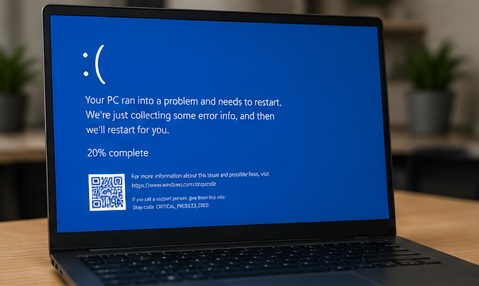
What Causes a Blue Screen Error?
A blue screen usually means Windows encountered a problem serious enough that it had to stop and restart.

The important thing to understand is that a blue screen is not always caused by one specific issue. It is a symptom. The real repair starts with finding the cause.
Common Blue Screen Symptoms We Fix
Customers often call us for problems like:
- Computer randomly restarts
- Blue screen appears during startup
- Windows gets stuck in a repair loop
- Computer crashes while gaming
- Laptop shuts down during updates
- Error codes appear repeatedly
- Computer freezes before restarting
- System works in Safe Mode but not normally
If your computer has only blue screened once, it may not be urgent. But if it happens repeatedly, it should be diagnosed before the problem gets worse or data is lost.
Should You Keep Using the Computer?
If the computer is crashing repeatedly, we recommend using it as little as possible until it is checked.
This is especially important if the issue is caused by a failing drive. Continued use can make data recovery harder if the drive gets worse.
If you have important files on the computer, avoid running repair tools randomly unless you know the cause of the problem. Some “fixes” can make things worse when the real issue is hardware failure.
Our Blue Screen Repair Process
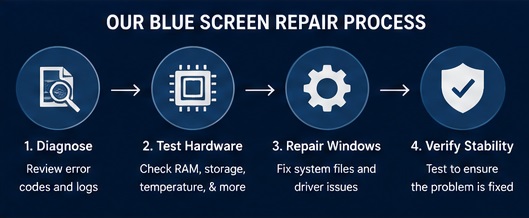
We do not guess or simply reinstall Windows without checking the system first.
Our process usually includes:
1. Diagnose
We look at the blue screen message, crash history, and Windows logs to identify patterns.
2. Hardware Testing
We test common failure points, including storage drives, memory, temperature, and power-related issues.
3. Driver and Software Test and Repair
Bad drivers, failed updates, and conflicting software can all cause repeated crashes. If Windows system files are damaged, we repair the operating system whenever possible.
4. Final Testing
After repair, we test the system to make sure the crashes are resolved and the computer is stable.
Will I Lose My Files?
In many cases, no.
If the issue is caused by a driver problem, software conflict, Windows corruption, or failing update, your files can usually be preserved.
However, if the blue screen is caused by a failing hard drive or SSD, your data may be at risk. In that situation, we will explain your options before continuing.
Our goal is always to protect your files whenever possible.
Is It Better to Repair or Replace the Computer?
That depends on the age, condition, and value of the computer.
Repair often makes sense if:
- The computer is less than 6–7 years old
- The problem is limited to one failed part
- Your files and programs are important
- The repair cost is much lower than replacement
- The computer still meets your needs
Replacement may make more sense if:
- The computer is very old
- Multiple parts are failing
- The repair cost is close to a new system
- The computer no longer supports your software
- You have been unhappy with performance for a long time
We will give you an honest recommendation, even if that means telling you not to repair it.
Blue Screens on Gaming PCs
Gaming computers can blue screen for different reasons than ordinary office computers.
Common causes include:
- Graphics driver issues
- Overheating
- Power supply problems
- RAM instability
- Failed overclock settings
- GPU problems
- Game software conflicts
If your gaming PC crashes during games but works normally at the desktop, the issue may only appear under load. We can test the system and help narrow down whether the problem is hardware, software, heat, or power related.
For related help, see our Gaming PC Repair in Durham page.
Blue Screens After a Windows Update
Some blue screen problems begin right after Windows installs an update.
This can happen when:
- A driver update fails
- Windows system files become corrupted
- An old program conflicts with a new update
- The update exposes an existing hardware problem
We can often repair Windows, remove problematic updates, or restore the system without wiping everything.
In-Home Blue Screen Troubleshooting
SureTech Services offers convenient in-home and drop-off repair options throughout Durham and nearby communities.
In some cases, we can diagnose the issue at your home or office. If the repair requires extended testing, parts replacement, or data backup, we may recommend bringing the computer in for deeper work.
We serve:
- Durham
- Chapel Hill
- Cary
- Morrisville
- Hillsborough
- Research Triangle Park
- Nearby Triangle communities
Technician Tip
If your computer blue screens once and then works normally for weeks, it may not be a major issue.
But if the crashes happen repeatedly, start after an update, or occur while opening certain programs, do not ignore it. Repeated blue screens often get worse over time and can sometimes be an early warning sign of hardware failure.
Related Services
If your computer is blue screening, you may also need:
- Data Recovery in Durham
- SSD Upgrades in Durham
- Computer Running Slow Repair
- Virus Removal in Durham
- Gaming PC Repair in Durham
- New Computer Setup in Durham
Frequently Asked Questions
Can a blue screen be fixed?
Yes, many blue screen errors can be repaired. The key is finding the real cause instead of guessing.
Does a blue screen mean my computer is dead?
Not usually. A blue screen means Windows encountered a serious problem, but the computer may still be repairable.
Can bad RAM cause blue screens?
Yes. Faulty memory is one of the more common hardware causes of repeated blue screen crashes.
Can a failing hard drive cause blue screens?
Yes. A failing hard drive or SSD can corrupt Windows files and cause crashes, startup problems, or repair loops.
Should I reinstall Windows?
Not always. Reinstalling Windows may fix some software problems, but it will not solve failing hardware. We recommend diagnosing the cause first.
Can you recover my files if the computer will not start?
In many cases, yes. If the drive is still readable, we may be able to recover your files before repairing or replacing the system.
Ready to Stop the Crashes?
If your computer keeps restarting, freezing, or showing a blue screen, SureTech Services can help.
We will diagnose the issue, explain the cause in plain language, and recommend the most cost-effective repair.
Call SureTech Services today to schedule blue screen of death error repair in Durham, NC.
Blue Screen of Death Repair