
Lost Important Files? Don’t Panic—We May Be Able to Recover Them.
Losing family photos, business documents, tax records, or years of personal files can be one of the most stressful computer problems you’ll ever experience.
Whether your hard drive suddenly stopped working, your laptop won’t start, or you accidentally deleted important files, it doesn’t always mean your data is gone forever.
At SureTech Services, we provide professional data recovery services throughout Durham and the surrounding Triangle area. Our first priority is protecting your data and determining the safest recovery method before anything else.
The sooner you stop using the affected device, the better the chances of a successful recovery.
Common Data Loss Situations
We help customers recover data from many different situations, including:
- Hard drives that won’t spin up
- Computers that won’t boot
- Failed SSDs
- Accidental file deletion
- Formatted drives
- Corrupted Windows installations
- External hard drives that aren’t recognized
- USB flash drives
- SD memory cards
- Laptops damaged by liquid spills
- Power failures
- Blue screen crashes
If you’re unsure what happened, don’t worry. We’ll evaluate the situation and explain your options in plain language.
What Should You Do First?

If you believe important files have been lost:
Stop using the computer immediately.
Continuing to use the drive can overwrite files that may still be recoverable.
Don’t install recovery software.
Many online recovery programs write new data to the same drive you’re trying to recover, reducing the chances of success.
Avoid repeatedly restarting the computer.
If the drive is beginning to fail, every restart can make the situation worse.
Call a professional.
The sooner the recovery process begins, the better the chances of recovering your files.
Signs Your Hard Drive May Be Failing
A failing drive often gives warning signs before it stops working completely.
Watch for symptoms such as:
- Clicking or grinding noises (traditional HDD’s not SSD’s)
- Computer freezing while opening files
- Files disappearing
- Extremely slow performance
- Frequent blue screen errors
- Windows asking to repair the drive
- “Drive Not Found” messages
- Random restarts
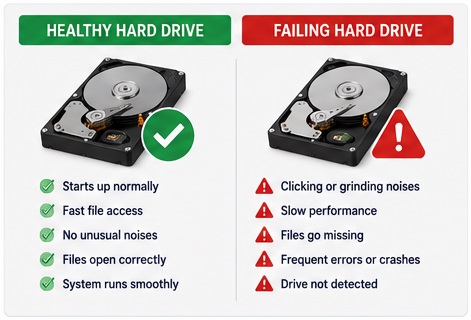
If you notice these symptoms, back up your important files immediately and stop using the drive whenever possible.
Our Data Recovery Process
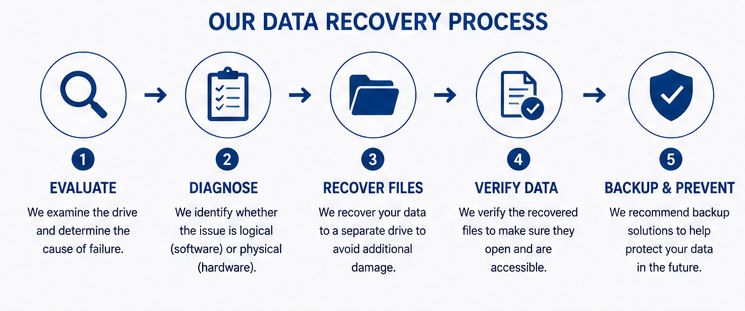
Every recovery begins with a careful evaluation.
1. Drive Evaluation
We determine whether the problem is logical (software) or physical (hardware).
2. Recovery Strategy
We choose the safest recovery method based on the condition of the drive.
3. Recover Files
Whenever possible, we recover your files to a separate storage device to avoid additional damage.
4. Verify Data
We verify that recovered files open correctly whenever possible.
5. Backup + Prevent
Once your data has been recovered, we’ll discuss repair, replacement, or backup options to help prevent future data loss.
Can Everything Be Recovered?
Unfortunately, no company can honestly promise a 100% recovery rate.
Success depends on many factors, including:
- How the drive failed
- Whether new data has overwritten old files
- Physical damage
- Age of the drive
- Previous repair attempts
We’ll always be honest about the likelihood of a successful recovery before proceeding.
Recovering Data from Computers That Won’t Start
One of the most common calls we receive is:
“My computer won’t turn on, but I need my files.”
In many cases, the drive itself isn’t the problem and the data is still intact.
If the storage device is healthy, we can often recover your documents, photos, and other important files even when Windows won’t load.
Data Recovery from External Drives
External hard drives and USB drives fail just like internal drives.
We regularly assist with:
- Portable hard drives
- Desktop external drives
- USB flash drives
- Memory cards
- Backup drives
If your drive suddenly disappears, asks to be formatted, or is no longer recognized, stop using it and contact us before attempting repairs.
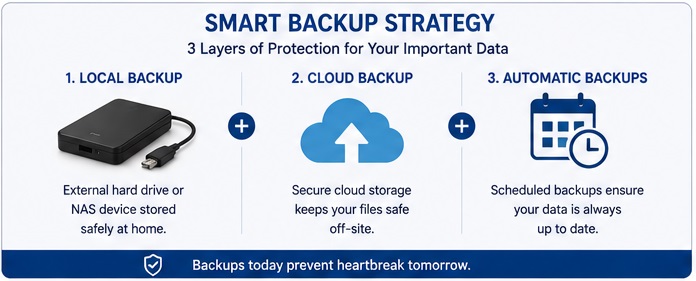
Protecting Your Data in the Future
The best recovery is the one you never need.
We can help you create a simple backup plan using:
- External hard drives
- Cloud storage
- Automatic scheduled backups
- Network storage devices
Even a basic backup can prevent years of memories or business files from being lost.
Technician Tip
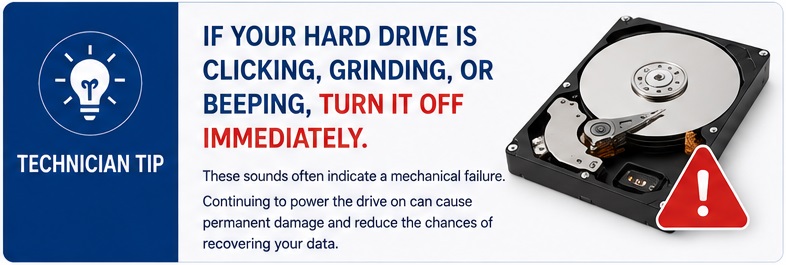
If your hard drive is making clicking, grinding, or beeping noises, turn the computer off immediately.
Those sounds often indicate a mechanical failure. Continuing to power the drive on may cause additional damage and reduce the chances of recovering your files.
Frequently Asked Questions
Can deleted files be recovered?
Often, yes. The sooner recovery begins, the better the chances of success.
Can you recover family photos?
In many cases, yes. Photos are one of the most common types of files we recover.
What if my computer won’t turn on?
That doesn’t necessarily mean your files are gone. We’ll determine whether the storage device can still be accessed.
Can you recover data from SSDs?
Yes, although SSD recovery can differ significantly from traditional hard drives. We’ll evaluate the drive and explain the available options.
How long does data recovery take?
Every recovery is different. Simple recoveries may be completed quickly, while more complex situations require additional time depending on the condition of the device.
Related Services
If you’re looking for data recovery, you may also be interested in:
- Blue Screen Repair
- SSD Upgrades
- Computer Running Slow
- Virus Removal
- New Computer Setup
- Laptop Screen Repair
Why Choose SureTech Services?
We understand that your files are often far more valuable than the computer itself.
Whether you’re trying to recover family memories, business records, school projects, or financial documents, we’ll treat your data with the care it deserves.
Our goal is to explain the recovery process clearly, recover as much data as possible, and help you avoid the same problem in the future.
Schedule a Data Recovery Evaluation
If you’ve lost important files or your computer has stopped working, don’t assume everything is gone.
Contact SureTech Services today for professional data recovery in Durham, NC.
The sooner you stop using the device and have it evaluated, the better the chances of recovering your valuable data.