
The Best Upgrade You Can Make for a Slow Computer
If your computer feels painfully slow every time you turn it on, you’re not alone. It’s one of the most common complaints we hear from customers throughout Durham and the surrounding Triangle area.
Many people assume they need to replace their computer when it starts slowing down. In reality, that’s often not the case.
For many older desktops and laptops, replacing the traditional hard drive with a modern Solid State Drive (SSD) can dramatically improve performance without the cost of buying a new computer.
At SureTech Services, we provide professional SSD upgrades for both Windows desktops and laptops. Whether you bring your computer to us or schedule an in-home appointment, we’ll help determine whether an SSD upgrade is the right solution for your system.
What Is an SSD?
A Solid State Drive, or SSD, is the device that stores Windows, your programs, and all of your personal files.
Older computers typically use mechanical hard drives with spinning disks and moving parts. While these drives were standard for many years, they’re significantly slower than today’s SSDs and are also more likely to fail over time.
An SSD has no moving parts. Instead, it uses flash memory similar to what’s found in a USB drive or smartphone. Because of this design, SSDs are:
- Much faster
- More reliable
- More resistant to bumps and vibration
- Nearly silent
- More energy efficient
For many computers, replacing the hard drive with an SSD provides the biggest improvement in everyday performance.

Is Your Computer a Good Candidate for an SSD Upgrade?
Many customers contact us because they’re frustrated with a computer that has become slower over time.
An SSD upgrade may be a good option if your computer:
- Takes several minutes to start.
- Is slow opening programs.
- Frequently displays a spinning loading circle.
- Freezes while multitasking.
- Becomes unresponsive after Windows updates.
- Uses a traditional hard drive instead of an SSD.
Even computers that are five to ten years old can often feel surprisingly responsive again after the upgrade.
How Much Faster Is an SSD?
The difference is noticeable almost immediately.
While every computer is different, many customers experience a drastic improvement in speed and responsiveness.

An SSD won’t turn a very old computer into a brand-new gaming system, but for everyday tasks like browsing the web, checking email, watching videos, or working from home, the improvement can be dramatic.
Will I Lose My Files?
This is one of the first questions we’re asked.
In most cases, no.
Whenever possible, we clone your existing drive directly onto the new SSD. That means your computer keeps:
- Windows
- Installed programs
- Documents
- Photos
- Music
- Downloads
- Desktop icons
- Browser bookmarks
- Email settings
When you get your computer back, it should look and feel familiar—just much faster.
If your original drive is failing or unreadable, we’ll discuss your recovery options before beginning any work.
Should I Upgrade or Buy a New Computer?
That’s a question we’re asked almost every week.
The honest answer is: it depends.
If your computer is generally meeting your needs but has simply become slow over time, an SSD upgrade is often a much more affordable option than replacing the entire system.
On the other hand, if your computer is over a decade old, has multiple hardware problems, or no longer supports current software, investing in a new computer may make more sense.
We’ll tell you which option we think provides the best value—even if that means recommending against a repair.
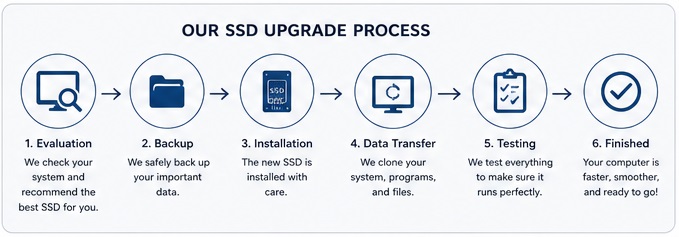
Every computer is a little different, so we begin by evaluating your current hardware.
Our process typically includes:
System Evaluation
We verify compatibility and determine which SSD best fits your computer and your storage needs.
Data Protection – Backup
Whenever possible, we create a copy of your existing drive before beginning the upgrade.
Installation
The old hard drive is removed and the new SSD is professionally installed.
Data Transfer
We migrate your operating system, programs, and personal files so everything is ready to use.
Performance Testing
Before returning your computer, we verify that Windows starts correctly, your applications load properly, and the system is operating normally.
SSD Upgrades for Laptops and Desktop Computers
We install SSDs in many different types of computers, including:
- Dell
- HP
- Lenovo
- ASUS
- Acer
- MSI
- Custom-built PCs
Not sure whether your computer can be upgraded?
We’ll be happy to check before recommending any work.
In-Home SSD Installation Available
One advantage of choosing SureTech Services is that you don’t always have to disconnect your computer and take it to a repair shop.
For many upgrades, we can perform the work at your home or office.
If additional time is required, we’ll let you know before taking your computer and keep you informed throughout the repair.
We proudly serve customers throughout Durham, Chapel Hill, Hillsborough, Cary, Morrisville, Research Triangle Park, and nearby communities.
Frequently Asked Questions
How long does an SSD upgrade take?
Many upgrades can be completed within one business day, although the exact time depends on the amount of data being transferred and the condition of the original drive.
Can an SSD fix a slow computer?
If your current hard drive is the primary bottleneck, yes. An SSD is often the single most effective performance upgrade available for older computers.
If the slowdown is caused by malware or failing hardware, we’ll explain those issues and recommend the most appropriate solution.
How much storage do I need?
The right size depends on how you use your computer, but you need a drive that is the same size or larger than your current drive.
During your evaluation, we’ll recommend a drive size that fits both your current storage needs and future growth.
Are SSDs more reliable than hard drives?
Generally, yes.
Because SSDs have no moving parts, they’re less susceptible to physical wear than traditional mechanical drives.
Like any storage device, however, regular backups remain important.
Related Services
If you’re considering an SSD upgrade, you may also be interested in:
- Computer Running Slow
- Data Recovery
- Virus Removal
- New Computer Setup
- Blue Screen Errors (Coming Soon)
Why Choose SureTech Services?
We know there are plenty of places to have your computer repaired.
Our goal is simple: provide honest recommendations, quality workmanship, and convenient service without the pressure or confusion that often comes with technology repairs.
Whether you need an SSD upgrade, help troubleshooting a slow computer, or advice on whether it’s time to replace your system, we’ll explain your options in plain English and help you make the decision that’s right for you.
Ready to Speed Up Your Computer?
If your computer has become frustratingly slow, don’t assume you need to replace it.
An SSD upgrade may be all it takes to give your system a second life.
Contact SureTech Services today to schedule an evaluation or an in-home appointment. We’ll help you determine whether an SSD upgrade is the right solution and get your computer running as efficiently as possible.
SSD Upgrade in Durham, NC