
Slow Wi-Fi? Constant Disconnects? We Can Help.
There’s nothing more frustrating than paying for high-speed internet only to deal with buffering videos, dropped Zoom meetings, or Wi-Fi that barely reaches the other side of your house.
Many people assume their internet provider is the problem, but that’s not always the case.
In many homes, the issue is actually the wireless network itself. Older routers, poor placement, interference from nearby devices, or incorrect settings can all lead to slow or unreliable Wi-Fi.
At SureTech Services, we troubleshoot and optimize home Wi-Fi networks throughout Durham and the surrounding Triangle area. Whether you need help connecting new devices, improving coverage, or solving constant disconnects, we’ll diagnose the problem and recommend the most practical solution.
Common Wi-Fi Problems We Fix
Every home network is different, but these are some of the most common issues we see.
Slow Internet Speeds
Your internet package may advertise hundreds of megabits per second, yet your devices struggle to load websites or stream videos.
This can be caused by:
- Older routers
- Weak Wi-Fi signal
- Device congestion
- Incorrect router placement
- Outdated firmware
- Interference from neighboring networks

Wi-Fi Keeps Disconnecting
If your laptop, phone, or smart TV constantly loses connection, we’ll determine whether the issue is your router, modem, internet provider, or the device itself.
Dead Zones Around the House
Many homes have rooms where Wi-Fi barely works.
These “dead zones” are often caused by:
- Thick walls
- Brick or concrete construction
- Router placement
- Large homes
- Multiple floors
- Wireless interference
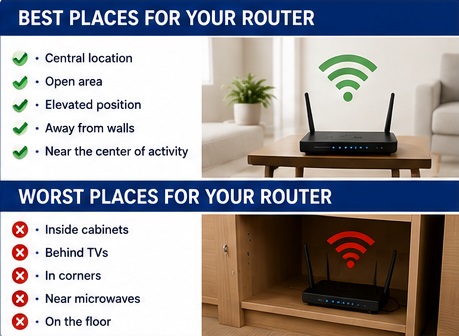
We can recommend repositioning your router, installing a mesh Wi-Fi system, or adding an access point if needed.
Devices Won’t Connect
New laptops, printers, security cameras, and smart home devices sometimes refuse to connect to Wi-Fi.
We can help configure:
- Desktop computers
- Laptops
- Smartphones
- Tablets
- Smart TVs
- Streaming devices
- Wireless printers
- Security cameras
- Smart home equipment
Wi-Fi Is Fine Upstairs but Terrible Downstairs
This is one of the most common complaints we receive.
The solution isn’t always buying a more expensive router.
Sometimes moving the router just a few feet or changing wireless channels can make a significant difference.
Is It Your Internet or Your Wi-Fi?
Many customers blame their internet provider when the real problem is the home network.
During our visit we’ll help determine whether the issue involves:
- Internet service
- Router
- Modem
- Wi-Fi signal
- Device settings
- Network congestion
- Cabling
- Hardware failure
Knowing where the problem actually exists prevents unnecessary equipment purchases.
Our Wi-Fi Troubleshooting Process

Every network is different, so we start with a full evaluation.
1. Network Assessment
We inspect your modem, router, and connected devices.
2. Speed Testing
We compare wired and wireless performance to identify bottlenecks.
3. Optimize Router
We check Wi-Fi coverage throughout your home and identify weak signal areas.
4. Improve Coverage
Depending on what we find, we may:
- Reposition the router
- Adjust wireless channels
- Update firmware
- Improve security settings
- Configure dual-band networks
- Optimize connected devices
5. Final Testing
Before we leave, we’ll verify that your devices are connecting properly and that the network is performing as expected.
Should You Upgrade Your Router?
Not every slow network requires new equipment.
However, replacing an older router often makes sense if:
- It’s more than five years old.
- It frequently disconnects.
- It doesn’t support modern Wi-Fi standards.
- You have many connected devices.
- You recently upgraded your internet speed.
We’ll tell you honestly whether your current equipment is still adequate or whether an upgrade would provide noticeable improvement.
Home Office Wi-Fi
Reliable internet has become essential for remote work.
If you’re experiencing:
- Video calls freezing
- Slow VPN connections
- Dropped meetings
- File upload problems
we can optimize your network for a more stable work-from-home experience.
Wireless Printer Problems
Many printer problems are actually Wi-Fi problems.
If your printer keeps showing “Offline,” won’t print wirelessly, or disappears from your computer, we can usually resolve those issues without replacing the printer.
For more information, visit our Printer Repair page.
Technician Tip

One of the biggest mistakes homeowners make is hiding the router inside a cabinet or behind a television.
Routers work best when they’re placed in an open, central location away from large metal objects and other electronics.
Simply moving the router can sometimes improve wireless coverage more than buying new equipment.
Frequently Asked Questions
Can you improve Wi-Fi without replacing my router?
Often, yes. Many problems are caused by placement, settings, or interference rather than hardware failure.
Should I buy a mesh Wi-Fi system?
Large homes or homes with multiple floors often benefit from mesh systems, but not every home needs one. We’ll recommend the most practical solution based on your layout.
Can you connect all my devices?
Yes. We can connect computers, printers, TVs, phones, tablets, streaming devices, security cameras, and many other Wi-Fi-enabled devices.
Can you help after I switch internet providers?
Absolutely. Many customers need assistance reconnecting their devices after changing internet providers or installing a new router.
Related Services
If you’re having Wi-Fi problems, you may also be interested in:
- Printer Repair
- New Computer Setup
- Computer Running Slow
- Outlook Repair
- Virus Removal
- Data Recovery
Why Choose SureTech Services?
Technology should work for you—not against you.
Our goal isn’t simply to fix today’s Wi-Fi problem. We want your entire home network to be reliable, secure, and easy to use.
We’ll explain the issue in plain language, recommend only the solutions you actually need, and make sure everything is working before we leave.
Schedule Wi-Fi Repair Today
Whether you’re dealing with slow internet, weak wireless coverage, devices that won’t connect, or constant disconnects, SureTech Services is here to help.
We proudly provide in-home Wi-Fi troubleshooting and home network optimization throughout Durham, Chapel Hill, Cary, Hillsborough, Morrisville, Research Triangle Park, and surrounding communities.
Call today to schedule an appointment and enjoy a faster, more reliable home network.
Wi-Fi Repair in Durham, NC